GMT watches are incredibly popular, with models like the Rolex GMT Master II prized by newbie and pro watch collectors alike. However, if you’re relatively new to the world of all things horological and are just now becoming acquainted with different types of watches and their unique features, you might not be using your timepiece to its full potential.
Luckily, learning how to use a GMT watch is pretty easy. Here’s what you need to know.
What You Will Learn
What Is a GMT Watch?
Before we discuss how to properly use a GMT watch, let’s first define it and explain the unique GMT function.
At its core, a GMT watch tracks time in two different time zones. A specially made rotating bezel is at the heart of the design, which allows you to check the clock in two different places with just a quick glance as opposed to a jump hour hand design. Some models can even simultaneously track a third time.
In addition to the normal second, minute, and hour hand and the GMT bezel that shows 24-hour markers, a GMT watch also features a fourth hand, called the GMT hand, that tracks GMT time.
“GMT” stands for Greenwich Mean Time, the universally accepted means of tracking time zones, beginning at the Prime Meridian in Greenwich, London. As such, if you see abbreviations like GMT+0 or GMT-5, you can interpret that, respectively, as zero time zones away from Greenwich (aka London time) or five time zones west of Greenwich (aka New York time).

How to Set the GMT Hand
There are more complicated ways of using a GMT watch, but for beginners, the below two-step process is how to use GMT watch settings at their simplest, without rotating the watch bezel. This ensures that the bezel’s zero-hour marker sits at the top of the watch, in line with your watch face’s 12-hour marker.
1. Find the GMT Hand
First, you’ll need to identify the GMT hand on your watch. It’s typically quite different from the other hands on the watch face. For example, your hour and minute hands may be one color, while the GMT hand may be another. Your watch may feature a red, blue, or yellow GMT hand, and it may likewise be a distinct arrow shape.
2. Set the GMT Hand
Without rotating the watch bezel (which shows the time in 24-hour military time), you’ll want to set the GMT hand to reflect the local time in your home time zone.
For example, let’s say you want to track the time at home in California while you’re in New York. If it’s 7 p.m. in New York, it’ll be 4 p.m. in California, so you would set the GMT hand so it points at the 16-hour marker (aka 4 p.m.).
To set the GMT hand, pull the watch crown out to the position for the GMT hand and twist it until the GMT hand moves to the desired hour marker on the bezel. Be careful as you do this part. If done incorrectly, like pulling out the watch crown to the wrong position or twisting in the wrong direction, you could accidentally move the date tracker or regular hour hand, at which point, you’ll need to reset them, too.
How to Track Multiple Time Zones Using GMT/UTC Time
Some GMT watch wearers may prefer to set their GMT hand in a somewhat more complicated way that allows them to track three time zones at once. If you’d like to try this, you can quickly adjust your GMT watch to track a third time zone by using the bezel and coming in with some knowledge of GMT and UTC zones.
First, it’s important to note that UTC is just the updated version of GMT, with greater accuracy. But the concept is still the same: GMT-0 is UTC-0, GMT-5 is UTC-5, etc.
Here’s how to do it:
- Set the GMT hour handto the current UTC-0 time. So, whatever the time currently is in London, you’d set your GMT hand to that hour.
- Adjust the bezel to whatever time zone you want to track, aligning it with the GMT hand (but only after the GMT hand is in current UTC-0 time).
Using this method, you can monitor your local time zone via the normal hour and minute hand, the GMT timezone using the GMT hand, and a third time zone using the bezel.
A Quick Example
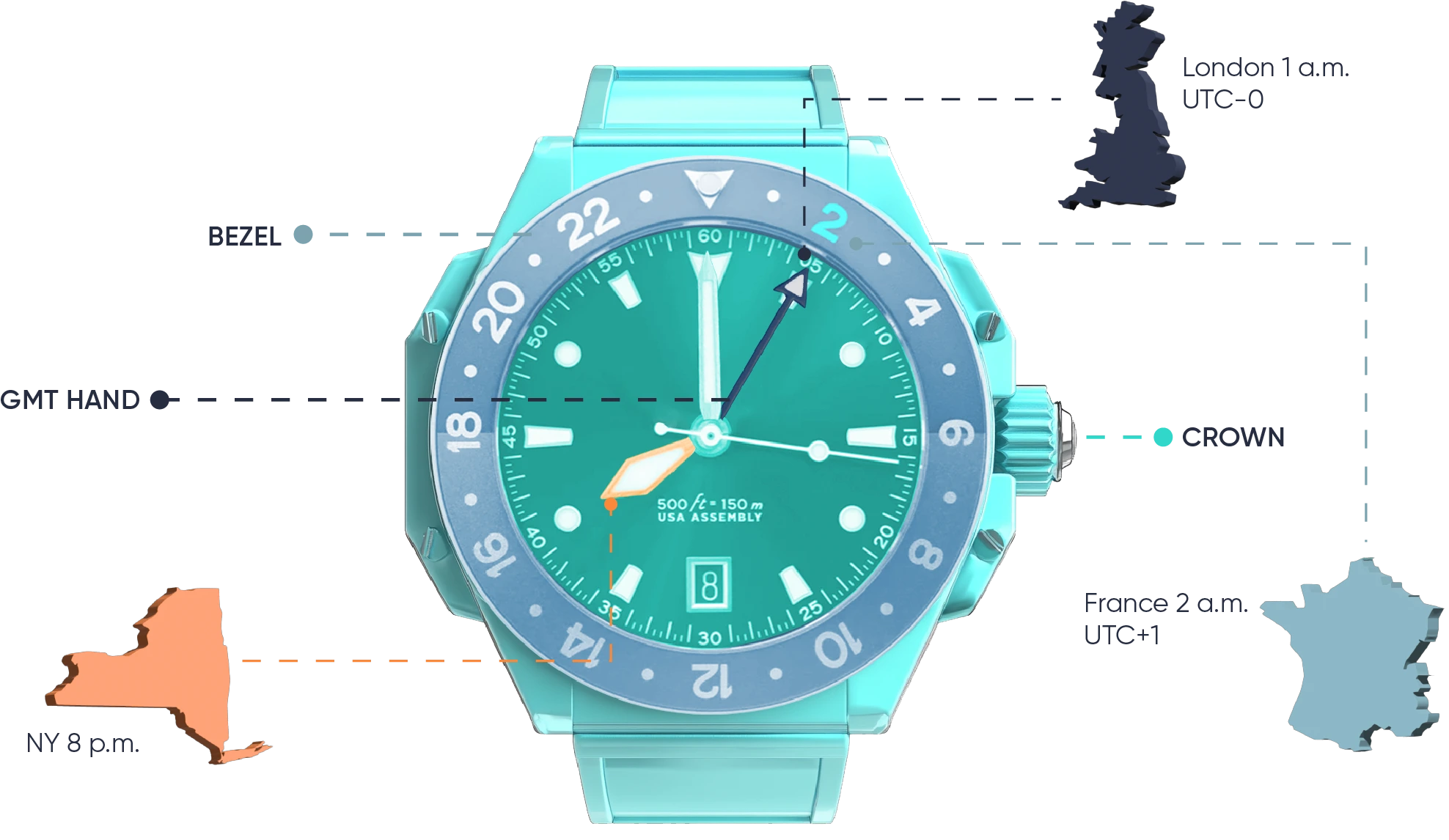
Let’s say you want to keep an eye on the time locally in New York and know the destination time in London (UTC-0) and Paris (UTC+1). Let’s also say it’s 8 p.m. in New York City.
In this scenario, you’d keep the regular hour and minute hands on the local New York time. Then, you’d adjust the GMT hand to London or UTC-0 time, which, in this case, would be 1 a.m.
Lastly, you’d adjust the bezel, working forward from the zero-hour marker but adding one hour since Paris is in the UTC+1 time zone. This way, the 1-hour mark on the bezel will be flush with the 12-hour marker on the watch face. This will result in the GMT hand pointing to the correct time for Paris on the bezel (i.e., 2 a.m.) while it also pointing to the correct UTC time on the watch face.
If you ever need to quickly know the time in a different time zone, all you need to know is how many time zones away from UTC-0 it is and adjust the bezel forward to the correct number of hours.
So, if a time zone is UTC+3, you’d align the 3-hour marker on the bezel with the 12-hour marker on the watch face, and so on. With the GMT hand set to UTC-0 time, it will always point to your desired time zone on the bezel, while the GMT hand always points to UTC-0 time on the watch face.
How to Use a GMT Watch FAQs
What’s the Purpose of a GMT Watch?
You can track dual time using a GMT watch, for example, when traveling and you want to track your origin and destination time simultaneously.
Do You Have to Adjust Your GMT Watch for Daylight Saving Time?
If your watch is set to track both local time and GMT, you may need to adjust the local time according to daylight saving time. However, GMT does not change with daylight saving time.
What Are Some Popular GMT Watch Models?
Rolex produces many popular GMT watch models, including the Rolex Explorer II, the Rolex GMT Master, and the Rolex GMT Master II.
Do You Really Need a GMT Watch?
While a GMT watch isn’t necessary for the average watch wearer, it can be convenient for frequent travelers or those who do business internationally or across multiple time zones for the purpose of tracking time.
How Many Time Zones Can You Read with a GMT Watch?
Most GMT watches are only designed to allow you to read two time zones, but if you’re a GMT master, you can adjust your watch to display three time zones at once. This is done by setting the GMT hand to UTC time and the bezel to a third time zone.
Have a GMT Watch? Protect It!
Now that you know a little more about tracking time using a GMT watch, ensure your valuable timepiece is always protected with comprehensive luxury watch insurance. A policy like BriteCo offers covers your collection from theft, damage, or loss anywhere in the world.
Learn more about BriteCo’s affordable policies and get your quote now, and if you’re curious about coverage, check out how watch insurance works.
Also Check:
Expert Tips on How to Store a Watch!
What Are ETA Movements?
The Best Way to Get Audemars Piguet Insurance
Do Omega Watches Hold Their Value?
Breitling Watch Insurance Protects Valuable Timepieces
How Much Is Watch Insurance?
Why You Need Omega Watch Insurance
How to Wear a Pocket Watch
Is a Watch Considered Jewelry?
Get a Quote:
The Easy Way to Insure Your Jewelry - and Save Money!
UP NEXT: The Most Famous Missing or Stolen Watches

Author